Flutter app development is the practice of building mobile, web, and desktop apps with Flutter, Google's open-source UI toolkit, using one codebase written in the Dart language. Instead of writing one app in Swift for iOS and a second in Kotlin for Android, you write the interface and logic once, and Flutter compiles it into a native app for each platform. Flutter 1.0 shipped in December 2018, and the toolkit now targets iOS, Android, web, Windows, macOS, and Linux.
This guide explains what app development with Flutter means in practice, why teams choose it, and how to build your first app step by step. You will also see how Flutter works under the hood, how it compares with React Native and fully native builds, and what to plan before you ship a production app.
Eagle Technologies delivers Flutter and React Native apps alongside native iOS and Android work. The advice below is framed around how those choices play out on real projects, including the cases where Flutter is not the right tool.
Why Flutter app development is worth considering
Flutter app development matters because one team can ship a consistent app on several platforms from a single codebase. That cuts duplicated work and keeps your iOS and Android versions from drifting apart.
One codebase, fewer moving parts
With two native apps, every feature is built twice, every bug is fixed twice, and the two versions slowly diverge. A shared codebase removes most of that. Flutter also draws every pixel itself with its own rendering engine, so a button looks the same on an older Android phone and a new iPhone. Design consistency comes by default instead of by effort.

Development speed is the second benefit. Flutter's hot reload lets you change code and see the result in the running app within a moment, without restarting it. Designers and developers can tune spacing, colors, and animations together in real time. Google Pay, Alibaba, Nubank, and BMW all use Flutter in production, so it is no longer an experiment.
Take a hypothetical delivery app with 12 screens. Natively, you build and test those 12 screens twice, and every later change happens twice. With Flutter, you build them once and spend extra time only on platform-specific work such as push notification setup, store listings, and device testing. Expect a meaningful saving rather than a clean halving, because design, backend, and release work do not shrink.
Flutter's real gain is not writing less code once. It is maintaining one app instead of two for years.
Where Flutter fits and where it does not
Flutter suits apps whose value sits in screens, forms, lists, and flows rather than in deep hardware access. The table shows how common app types line up.
| App type | Flutter fit | Reason |
|---|---|---|
| Retail and marketplace apps | Strong | Catalog, cart, and checkout look identical on both platforms |
| Fintech and banking | Strong | Nubank runs on it, and biometric login is available through plugins |
| Internal business apps | Strong | Small teams, one codebase, fast updates |
| Content and social apps | Good | Custom UI and animation are easy, but media features need careful plugin choices |
| 2D and casual games | Good | Simple games work well, while 3D titles belong in a game engine |
| Heavy AR, 3D, or hardware-driven apps | Weak | They depend on native SDKs and tight OS integration |
| SEO-driven content websites | Weak | A conventional web stack serves search crawlers better |
Flutter has real drawbacks too. Apps start larger than a minimal native app because the engine ships inside them. The Dart talent pool is smaller than the JavaScript pool. And when a plugin does not exist for a device feature, someone has to write native Kotlin or Swift code to bridge the gap.
How to start app development with Flutter
To start, install the Flutter SDK, run flutter doctor to check your setup, create a project with flutter create, and run it on an emulator or a real device. The first run is mostly waiting for downloads.
Set up your environment
Follow the official Flutter installation guide for your operating system, then work through this checklist:
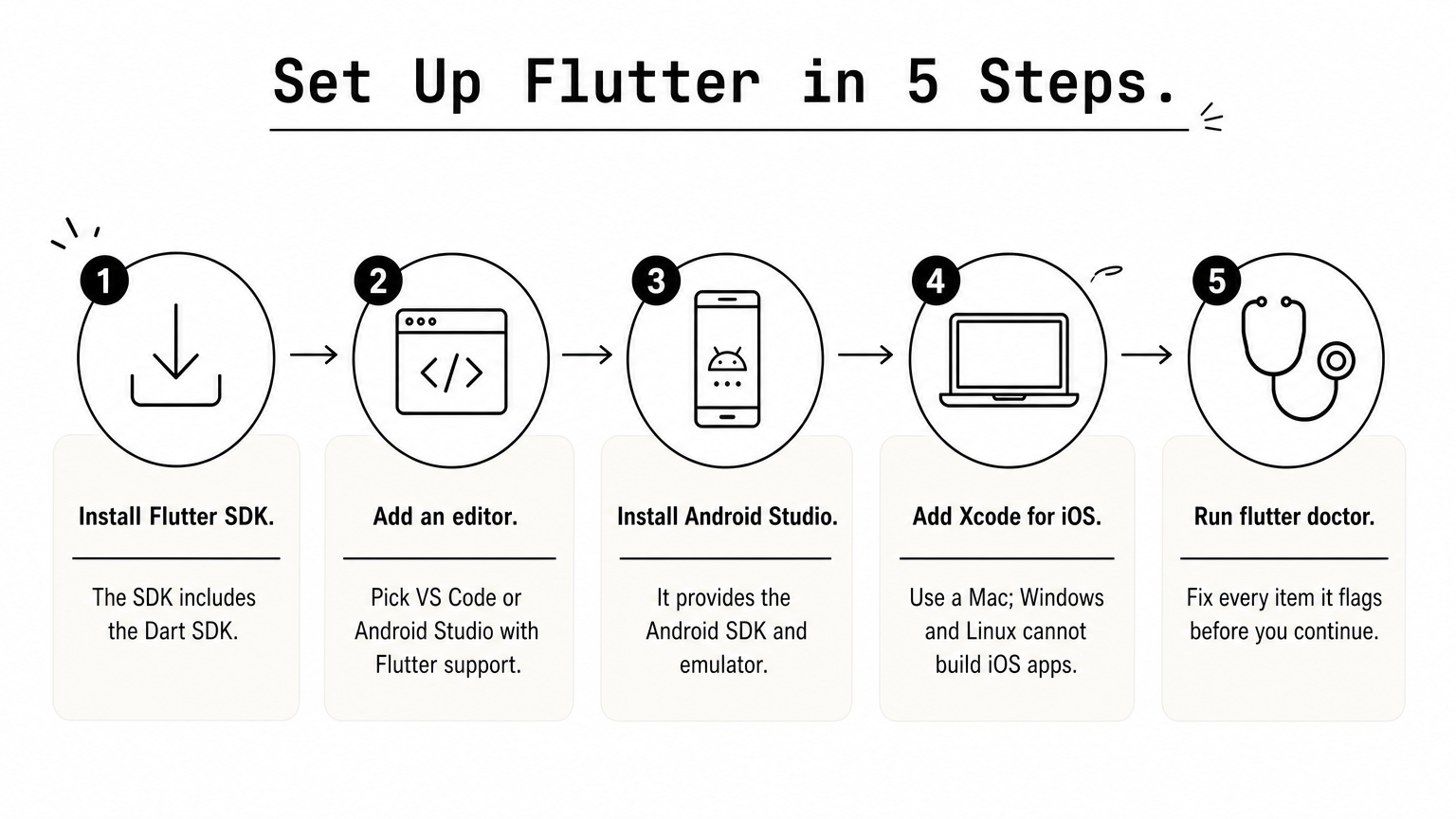
- Install the Flutter SDK, which includes the Dart SDK.
- Install an editor: Visual Studio Code with the Flutter extension, or Android Studio with the Flutter plugin.
- Install Android Studio for the Android SDK and emulator, even if you write code in VS Code.
- For iOS, use a Mac with Xcode. Windows and Linux machines cannot build iOS apps.
- Run
flutter doctorand fix every item it flags.
The flutter doctor command is the quickest way to find a missing license, a broken path, or an absent toolchain. Do not skip it.
Create and run your first project
Open a terminal in the folder where you keep projects and run these commands:
flutter create hello_flutter
cd hello_flutter
flutter run
Flutter generates a counter app and launches it on the connected device, emulator, or Chrome. To see how little code a Flutter app needs, replace the contents of lib/main.dart with this:
import 'package:flutter/material.dart';

void main() => runApp(const MyApp());

class MyApp extends StatelessWidget {
  const MyApp({super.key});

  @override
  Widget build(BuildContext context) {
    return const MaterialApp(
      home: Scaffold(
        body: Center(child: Text('Hello, Flutter')),
      ),
    );
  }
}
Save the file while the app is running. Hot reload updates the screen at once. Change the text, then wrap it in a Padding widget, and watch how the interface responds.
Learn the basics in the right order
Learning order matters more than course choice. This sequence avoids the usual dead ends:
- Dart fundamentals: types, null safety, classes, and async/await. The Dart language tour covers them.
- Widgets: the difference between stateless and stateful widgets.
- Layout:
Row,Column,Stack,ListView, and how constraints flow down the tree. - Navigation: moving between screens and passing data.
- State management: start with
setState, then move to Provider, Riverpod, or Bloc when screens share data. - Data: HTTP calls, JSON parsing, and local storage.
- Testing and release: unit, widget, and integration tests, then store builds.
You do not need prior mobile experience, but object-oriented programming knowledge helps a lot. Developers coming from JavaScript, Java, or C# usually find Dart familiar within days.
Learn Dart and widgets properly before touching state management libraries, because every library assumes you understand the widget tree.
How Flutter works under the hood
Flutter builds your interface from a tree of widgets, compiles Dart to native code, and draws everything with its own rendering engine instead of using the platform's built-in UI components. Knowing this explains both its strengths and its quirks.
Widgets, Dart, and the build cycle
In Flutter, almost everything is a widget: a button, a padding value, a theme, even the app itself. Widgets are immutable descriptions of what the screen should look like. When your state changes, Flutter rebuilds the affected part of the tree and updates only what differs on screen. Stateless widgets show fixed content, and stateful widgets hold data that changes over time.

Dart supports two compilation modes, and Flutter uses both. In debug mode, code runs through a just-in-time compiler, which makes hot reload possible. In release mode, Dart compiles ahead of time to native machine code, so the shipped app does not run through an interpreter or a JavaScript bridge.
Rendering and platform access
Flutter ships its own rendering engine and paints the UI onto a canvas. The platform provides only the window, touch input, accessibility hooks, and system services. This is why Flutter UIs look identical everywhere. It also means a new OS visual style does not appear in your app until Flutter and your code adopt it.
Device features such as the camera, GPS, biometrics, and payments reach your Dart code through plugins. The pub.dev package repository hosts thousands of them. Under the surface, plugins talk to native code through platform channels. If you need a feature no plugin covers, a developer writes a small Kotlin or Swift module and exposes it to Dart.
Flutter trades native look-and-feel for total control of the screen, and that trade is the root of most of its pros and cons.
Flutter vs React Native vs native development
Choose Flutter when you want one codebase and fully custom UI, React Native when your team already writes JavaScript or TypeScript, and fully native when you need the deepest platform access. The table compares the three.
Side-by-side comparison
| Factor | Flutter | React Native | Native (Swift and Kotlin) |
|---|---|---|---|
| Language | Dart | JavaScript or TypeScript | Swift for iOS, Kotlin for Android |
| Codebases | One | One | Two |
| UI approach | Draws its own widgets | Maps to native UI components | Uses the platform's own UI |
| Platform API access | Plugins and platform channels | Native modules | Direct |
| Talent pool | Smaller, growing | Large, from web developers | Large per platform |
| Best for | Custom, brand-driven UI on many platforms | Teams with JavaScript skills | Hardware-heavy or platform-specific apps |
Older cross-platform options have faded. Microsoft ended Xamarin support in May 2024, so .NET teams now look at .NET MAUI. Ionic wraps web technology in a mobile shell, which suits simple apps but rarely matches the smoothness of the options above.
Which option to pick
Use these rules to decide quickly:
- Pick Flutter if design consistency matters, you target several platforms, and you can hire or train Dart developers.
- Pick React Native if you already have a strong JavaScript team and want to share skills with a web app.
- Pick native if the app depends on AR, advanced camera pipelines, or the newest OS features on release day.
- Pick a mix when needed. Flutter can sit on top of native modules for the few features that demand them.
Pick the tool your team can hire for and maintain for five years, not the one that wins a benchmark.
Planning a production Flutter app
A production Flutter app needs the same planning as any mobile app: the right team, real-device testing, and a controlled release process. The framework speeds up the build but does not replace these steps.
Team and skills
A typical team has Flutter developers, a UI/UX designer, a backend developer, and a tester. Native knowledge still matters, because someone must handle platform channels, permissions, and store requirements. Design handoff matters too. Component libraries and clear specs let developers build widgets without guessing.
If you want a partner, Eagle Technologies' Mobile App Development service covers cross-platform apps built with Flutter, and its dedicated Android and iOS developers can handle native modules when a project needs them. For an in-house team, plan for Dart training from day one.
Testing, performance, and release
Test on real devices from both platforms, not only emulators. Flutter supports unit, widget, and integration tests, and its DevTools suite profiles frame rendering and memory. Before release, run through this checklist:
- Run the app on at least one low-end Android phone and one older iPhone.
- Profile in release mode, because debug builds are always slower.
- Build with
flutter build appbundlefor Google Play andflutter build ipafor the App Store. - Check store requirements for privacy declarations, icons, and screenshots.
- Set up CI/CD so every merge produces a testable build.
After launch, keep your Flutter and plugin versions current. Small, regular upgrades are far easier than a three-year jump.
Most Flutter problems in production come from skipped device testing and neglected dependency upgrades, not from the framework itself.
Is Flutter right for your app?
Flutter app development gives you one codebase, a consistent interface, and fast iteration, at the cost of larger app size, a smaller talent pool, and occasional native work. It fits retail, fintech, internal tools, and most consumer apps. It fits less well for heavy AR, 3D, or deeply hardware-bound products.
Start small. Install the SDK, build the hello-world app, then rebuild one real screen from your product in Flutter. That single exercise tells you more about fit than any comparison table.
If you would rather scope the project with a team that builds cross-platform and native apps, book a free strategy session with Eagle Technologies and bring your app idea.